
Forage
Forage is the shared queue for signals that may influence the product. It combines requests submitted directly to Hive with issues and alerts from connected systems.
What appears in Forage
Hive can show:
- Feature requests, bug reports, and feedback submitted from the dashboard, Slack, or connected clients.
- Open issues from repositories linked to projects.
- Firing and resolved Grafana alerts received through project webhooks.
Use the filters and search field to narrow the queue by type, status, domain, or repository. Each item has a detail page for its source, description, domains, and discussion.
Submit an item
Signed-in users can open Forage, select New item, choose a type, and provide a title and description.
An administrator chooses the intake destination under Ops (Operations) → Forage:
- Hive-managed item stores the request in Hive.
- GitHub issue creates the request in a selected linked repository and mirrors the resulting issue into Forage.
The same destination applies to dashboard submissions, Slack captures, and connected clients. When GitHub is the destination, only organization members can create items.
Discuss and shape an item
Signed-in users can comment on visible items. Authors can edit their own Hive-managed item and their own comments.
Organization members can select Create spec from a Forage item. The new spec keeps a link to the source so readers can move between the reported signal and the proposal that addresses it.
Act on an item with a Flight
Organization members can open a Grafana alert or GitHub issue, choose a linked repository and an Investigate, Reproduce, or Fix objective, and select Start Flight. The action is always manual.
Hive gives the agent an isolated snapshot of the selected repository and item context. The run can inspect files and execute commands inside that sandbox. Only a Fix Flight can publish returned file changes. The sandbox cannot receive the GitHub App credential, push a branch, or open a pull request itself.
When the Flight finishes, Hive shows the result on the item:
- A report for an investigation or reproduction attempt. A reproduction can succeed with a
Not reproducedoutcome. - A pull request when a Fix Flight returned changed files. Hive publishes the branch, commit, and pull request after the sandbox has stopped.
- A report when a Fix Flight could not make a safe change.
Reports for GitHub issue Flights are also posted as issue comments.
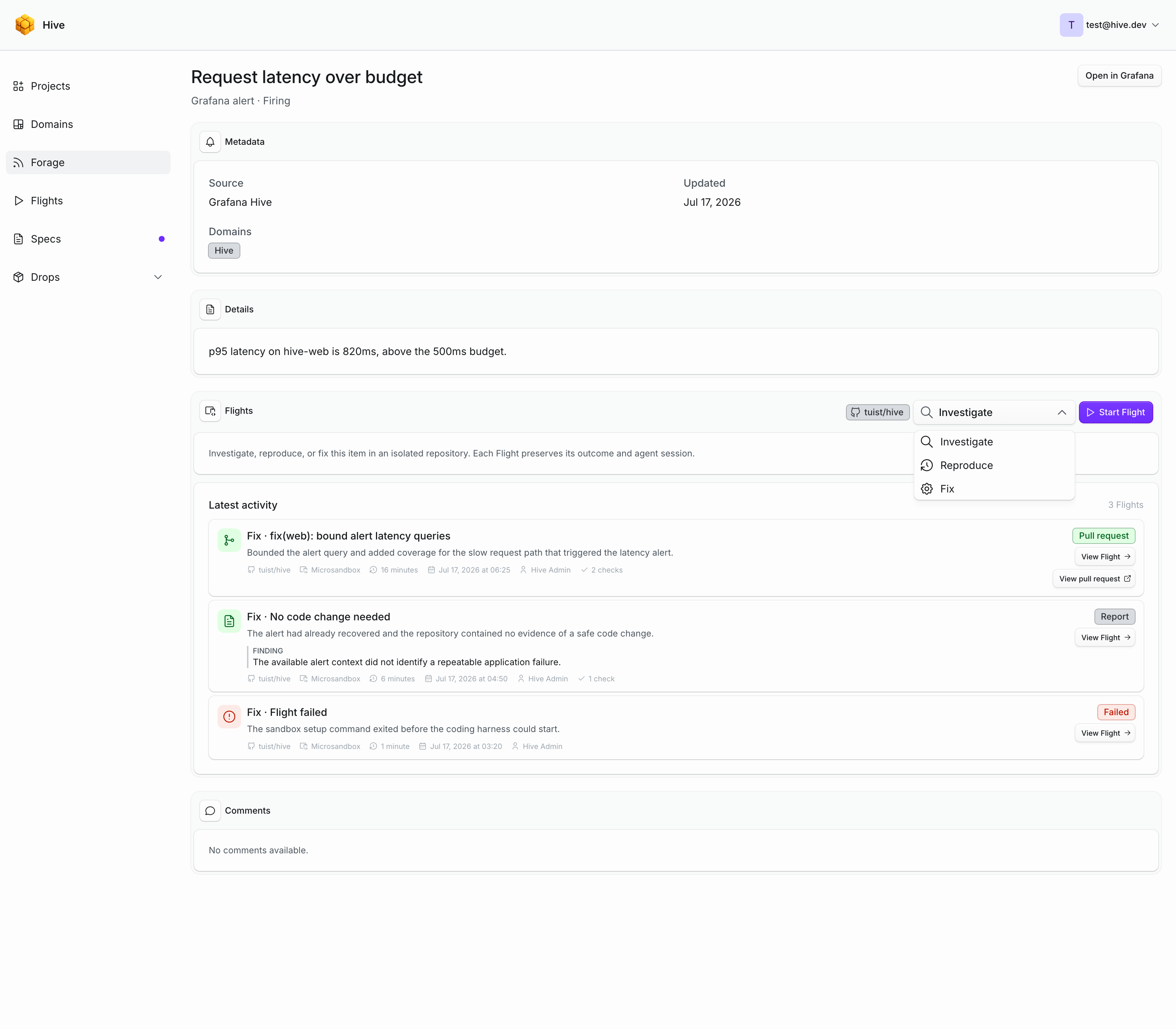
Only one Flight can be queued or running for the same item and repository at a time. Completed and failed Flights remain on the item and in the global Flights history. The same actions are available to connected clients through the Model Context Protocol with start_forage_item_flight. Flight history and continuation context are available through the application programming interface.
The action appears as unavailable until an operator configures Hive inference, the GitHub App, and a Flight runner.
Understand visibility
Directly submitted Hive items are public. GitHub issues follow the visibility of their linked repository and project. Grafana alerts are visible only to organization members.
Private or organization-only items are not exposed in public feeds or Slack link previews.
Subscribe
Forage and its source views expose Atom 1.0 and Really Simple Syndication feeds. See the feed reference for all addresses.
Signed-in users can select Follow on an item to receive email when its conversation or progress changes, including new comments, a spec created from the item, and completed Flights. Creating or commenting on a Hive-managed item follows it automatically. Hive never sends the person who caused an update an email about their own action.
Open Account → Notifications to choose immediate delivery, a daily summary, or to unfollow. The same page can subscribe to all new Forage items visible to the account.
Every message carries an unsubscribe link. On a message about a single item it stops that one item and leaves the rest of your follows in place, and the confirmation page also offers to stop the whole category. A daily summary covers several items at once, so its link stops the whole category.
Connecting a repository does not announce the issues it already has. Hive treats the first sync as filling in the backlog and only sends email for issues that appear or change afterwards.